
Facebook tracking pixel Skip to main content

Operations line

Operations, running

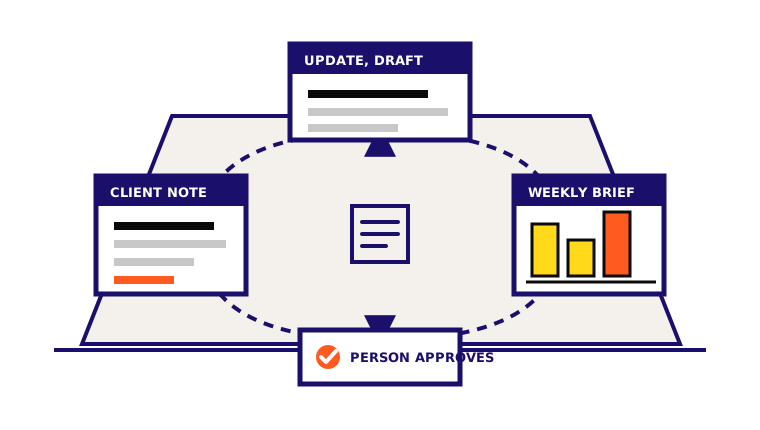
One line, two jobs. The Client Agent turns meetings and delivery notes into updates, actions, and health checks. The Report Agent turns the week into one brief: what moved, what is behind, what needs a decision. Nothing leaves the business without a person.

Operations agent loop: a client note becomes a drafted update and a weekly brief, each checked by a person before it leaves the business

Summary

Runs

Client updates, meeting recaps, onboarding steps, account health checks, weekly briefs, and claim checks

Reads

Meeting notes, delivery files, the KPI ledger, pipeline exports, and the client workspace

Writes

Drafted updates, action lists, health flags, the weekly brief, and dashboards with source paths

Guardrail

No client sees a message and no number reaches a report without a person

Direct answer

What the Operations Agent does

An Operations Agent runs the two jobs that keep a service business honest: client work (onboarding, meeting capture, updates, health checks, proof requests) and reporting (KPI memory, weekly reviews, dashboards, claim checks). It prepares and files the work; people approve anything a client or the public sees.

Price

Fixed build, monthly run

One build price and one run price, named before any work starts. No hourly billing, no retainer. Model and tool fees are separate and published on the pricing index.

Build, fixed

$18,000

About six weeks

  • Two agents: client work and reporting
  • Client updates and meeting recaps drafted before a person sends them
  • A weekly brief with what moved, what is behind, and what needs a decision
  • A KPI ledger the numbers come from, so nothing is invented

Run, monthly

$1,200/mo

Month to month, stop any time

  • Two weekly review loops, one per agent
  • Template and rule changes as the client list changes
  • Monitoring, with a person on the alerts

A real artifact

The weekly brief, as written

We do not publish client numbers without a name, a figure, and a date window. What we can show is our own operating output: this is one real artifact from our rollup routine, redacted, exactly as it was produced.

Produced
2026-08-28
Source
docs/blog/pipeline-weekly-2026-08-28.md

Coverage

9 contacts total, 0 attributed; 1,689 events total, 0 attributed. Attribution still broken; sessions are the only signal this week.

What moved

  1. benchmark-team-against-ninjacat-2026 · 31 sessions, 2.4x the next post
  2. ai-lead-scoring-lead-generation · 13 sessions
  3. crm-marketing-automation-integration · 9 sessions

What needs a decision

The attribution read-back is missing, so the kill-and-scale review cannot rank by pipeline. Fix the read-back before the next review, or rank by sessions and say so.

Produced by our rollup routine on 2026-08-28 about our own site, and the decision it raised was acted on the same week. Not a client result.

Where it helps

Use it when the work repeats

The first agent should have a clear job, known inputs, and a review path the team can keep using.

Best moments

  • Client updates go out late because the person who knows the status is busy delivering
  • The weekly numbers take a morning and still get questioned in the meeting
  • Handoffs live in someone's head and break when that person is out
  • The owner wants one brief on Monday instead of five tools on Sunday night

Inputs it needs

  • Meeting notes and call summaries
  • Delivery files, tickets, and project notes
  • The KPI ledger, or the exports to build one
  • Pipeline and CRM exports
  • Client goals and what was promised
  • The review habit: who approves what, and when

What it can run

Detailed agent work

These capabilities come from the public Conversion Skills patterns. The names under each card are the documented skills the build can draw from.

Turn meetings into actions

It captures a call or a meeting into decisions, owners, dates, and open questions, then files the recap where the team looks.

meeting-capture

Keep every client updated

It drafts the status update from delivery notes and the last recap, in the client's language, and holds it for a person to send.

project-updateclient

Onboard without the dropped ball

It runs the onboarding checklist, names the next step, and flags what the client still owes.

customer-onboarding

Watch account health

It reads activity, delivery, and tone across accounts and raises a flag with the reason before a quiet client becomes a lost one.

churn-watchportfolio-watch

Write the weekly brief

It turns the ledger and the week's notes into one page: what moved, what is behind, what needs a decision.

weekly-reviewbusiness-review

Keep the numbers honest

It builds the dashboard from the ledger and checks claims against sources, marking anything missing instead of inventing it.

exec-dashboardfact-checkermemory

How it works

Context, draft, review

Step 01

Load the workspace

The agent reads the client files, the KPI ledger, and the review rules first, so every draft starts from the business instead of a blank page.

Step 02

Prepare the week

It drafts updates, recaps, flags, and the brief, with sources attached wherever a number appears.

Step 03

Hand it to a person

Each artifact names the human move: send, fix, ask, or decide. Nothing goes out on its own.

Human gates

What stays human

The agent prepares work and keeps the trail clean. People still approve the moves that can affect buyers, customers, money, permissions, or public claims.

  • No client update, recap, or deliverable is sent by the agent
  • No number reaches a report without a source; missing data is marked, not filled
  • No commercial term, scope change, or account action without a person
  • One client workspace at a time; ambiguous client context stops the work

Outputs

What your team gets back

The useful output is not a magic answer. It is a reviewable artifact, a clearer next move, and a source trail for anything factual.

Client status updates, drafted and dated

Meeting recaps with decisions and owners

Onboarding checklists with the next step named

Account health flags with the reason

The weekly brief: moved, behind, decide

Dashboards and scorecards with source paths

Quick answers

Common questions about Operations Agent

Short answers for buyers comparing agent work, service scope, and human review boundaries.

What does an AI Operations Agent do?
It runs the two jobs that keep a service business honest: client work (onboarding, meeting capture, updates, health checks, proof requests) and reporting (KPI memory, weekly reviews, dashboards, claim checks). It prepares and files the work; a person approves anything a client or the public sees.
Is the Operations Agent one agent or two?
Two jobs, one line. The Client Agent and the Report Agent share one workspace, one memory, and the same review gates, so the client update and the weekly number come from the same source files.
When is the Operations line the right first build?
When updates go out late, the weekly numbers take a morning, and handoffs live in one person's head. If the pain is inbound leads, start with the Sales line. If it is content, start with Marketing.

Public standard

Built from Conversion Skills

Conversion Skills is the public reference for these patterns: plain files, documented skills, proof-aware outputs, and review gates. The agent pages show how that public method turns into useful business systems.

Explore Conversion Skills